> For the complete documentation index, see [llms.txt](https://docs.xbstation.com/llms.txt). Markdown versions of documentation pages are available by appending `.md` to page URLs; this page is available as [Markdown](https://docs.xbstation.com/xblink-duo/user-manual/advanced-configuration/telemetry.md).
# Telemetry
This section describes how to configure Telemetry.
## Hardware Setup
You can use Telemetry 1 or 2 of Pixhawk for connection with XBLink via **COM1** (Default).
More information for pinout of COM Port, please click to [**Pinout - Interface**](/xblink-sat-ndaa/user-manual/getting-started/interfaces.md#pinout)
## Software Setup
### XBStationPilotApp
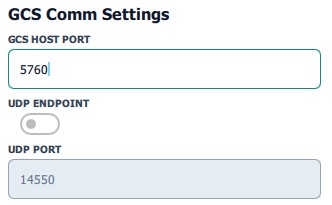
#### 1. GCS Comm Settings
**a. GCS HOST PORT**
TCP telemetry server port. The Ground Control Station can connect to this port via TCP to receive telemetry data with high reliability. The default port is 5760 **(or 5761, please see on XBStationPilotApp).**
**b. UDP ENDPOINT & UDP PORT**
Telemetry data is relayed through internet in 2 connections method:
* UDP to archive minimize latency (possible packet loss, suitable for Joystick mode)
* TCP method to achieve high reliability (**default**)
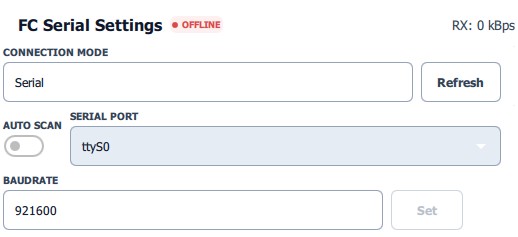
#### 2. FC Serial Settings
Serial Setting
**a. Serial Port**
Port allows you to choose serial port on companion computer
The companion computer will show all available port (ttyS0, ttyUSB0, ttyUSB1…). You have to choose exactly serial port. If you don’t know name port, you can try them one by one.
{% hint style="info" %}
Choose option is ttyS0 if you connect to **COM1** (ttyAMA4 -> **COM2**)
{% endhint %}
**b. Baudrate**
Baudrate allows you to choose serial baudrate on companion computer
The baudrate on companion computer have to same the baudrate (telemetry 2) on Pixhawk
* With PX4: **SER\_TEL2\_BAUD** (Default 921600), you should change **57600** for stable and save data.
* With ArduPilot : **SERIAL2\_BAUD** (Default **57**, it means 57600),\
**SERIAL2\_PROTOCOL**: **2** (MAVLink 2)
{% hint style="info" %}
**If you have problem with Telemetry 2 port, you can use Telemetry 1 Port**
**(Default baud rate Telemetry 1 is 57600 and SERIAL1\_PROTOCOL = 2)**
{% endhint %}
### GroundStation
#### Mission Planner
1. Open Mission Planner, at the top-right, choose **TCP** type and **Connect.**
2. Host name/ip: **127.0.0.1** (default)
3. Remote port: **5760** (default) or 5761 (*remember it must be same Telemetry Host Port in PilotApp*)

{% embed url="" %}
Mission Planner Setup
{% endembed %}
#### QGroundControl
1. Open QGroundControl -> Comm Links -> choose TCP type
2. Enter Host name/ip: **127.0.0.1** (default)
3. Remote port: **5760** or **5761** (*remember it must be same Telemetry Host Port in PilotApp*)
.jpg?alt=media&token=fb87517b-724b-49f1-a1e5-c09179c892d4)